

Introduction
The goal of this project is to understand the core principles underlying multiplayer development, embracing aspects such as latency, synchronization, and server/client authority. To accomplish this goal, I will develop a small multiplayer game, which will force me to gain a deep understanding of these core concepts.
Concept
The game I will develop is a co-op 2D top-down dungeon crawler, designed to bring together parties of up to four players on a LAN network. Players will embark on an adventure through three distinct levels, each offering its own challenges and mysteries to explore.
Multiplayer Network Models
There are multiple models for communication between clients in games. The most well known are Client-Server, Client-Host and Peer-To-Peer. Each of these models offers its own advantages and drawbacks.
Client-Server
Within this model there is a dedicated server to which all the clients will connect. It acts as a central authority, coordinating the actions of all players and enforcing the rules of the game which offers a lot of possibilities security wise. One of the downsights with this model is that there has to be an available dedicated server.

Client-Host
Within this model, instead of having a dedicated server, one of the clients will function as the server. This client is called the host. The host maintains a synchronized version of the game state that all other clients connect to. Additionally, the host manages the flow of information between clients, facilitating communication and ensuring fair gameplay. In multiplayer games, the role of the host is crucial for maintaining stability and preventing cheating or discrepancies in the game state.

Peer-To-Peer
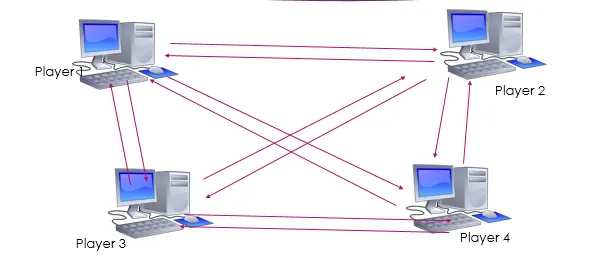
In the Peer-To-Peer model, every client connects directly to others, eliminating the need for a centralized administrative system to monitor the game state. However, this decentralized structure heightens security risks as there is no central authority, leaving the network open to potential attacks. Moreover, maintaining uniform rules and resolving conflicts becomes difficult without centralized control.
Authority
When developing a multiplayer game you will come across the topic of authority. Authority refers to the system that is responsible for making final decisions and maintaining the integrity of the game state. Within the Client-Host/Server model there are two forms of authority: server authority and client authority. It is possible to develop a game using either of these independently, as well as to integrate both forms of authority simultaneously.
Server Authority
Server authority dictates whether the server or the client holds final decision-making power. Full server authority ensures fairness, security, and consistency by giving the server control over all game mechanics. Partial server authority allows a balance between server and client control, improving the smoothness of gameplay while still preventing cheating.

Client Authority
Client authority grants permission to the client device in managing specific gameplay elements, such as controlling character movement or rendering visual effects, without requiring continuous confirmation from the server/host. This distribution of responsibility aims to enhance player experience by minimizing perceived delays, thus improving responsiveness during gameplay. However, this model presents challenges, including the heightened risk of cheating due to potential exploitation of client-side data or vulnerabilities. Additionally, ensuring synchronization between clients and the server becomes more complex as clients predict certain game events locally, potentially leading to discrepancies in the game state across different devices.
Netcode Synching
Netcode provides a variety of options to communicate between clients and the server. These are network variables, RPCs (Remote Procedure Calls) and Custom messages.
Network variables
NetworkVariable is a way to synchronize a property between a server and client(s) without the need for custom messages or RPCs. It supports basic types in C# and Unity, such as numbers, text, and special types like enums. NetworkVariables also include permissions for read and write access. By default, only the server can set the value, but this can be adjusted during NetworkVariable initialization. By default, everyone can read the NetworkVariable, but this setting can be modified to restrict access to only the object’s owner. The main advantage is that the NetworkVariable will be synchronized continuously, meaning that if a client connects halfway through the game, he or she will still receive the correct data.

RPCs
RPCs can be viewed as a way to send an event notification. They also serve as a means to handle direct communication between a server and a client (or vice versa). This is useful when the server has authority over an object. RPCs can be configured to send their call only to specified clients and/or the server, which helps limit network traffic. One of the advantages as well as downsides of RPCs is that it only sends calls when the current state changes, which can cause synchronization issues.

Solving Latency
When making multiplayer games, there is always latency in some way or form. Latency can be caused by multiple factors. Some examples of these are physical distance, network congestion, and packet processing. To improve clients’ experience when playing games, there are multiple ways to reduce latency or to reduce the feeling of latency. These include but are not limited to Client-side Authority, Client-side Prediction, and Server Rewind.
Network Congestion
Network congestion occurs when a network receives more data packets then it can handle. This backup of data traffic occurs when too many communication and data requests are made at the same time, over a network that doesn’t have enough network bandwidth to carry it.
Network congestion can be compared to rush hour traffic: too many cars (data) trying to use the same road (network) at once. When this happens, things slow down because the road can’t handle all the cars efficiently. Factors like too many devices connecting or sudden increases in data can cause congestion. During congestion, data takes longer to reach its destination, making internet slower and sometimes causing connections to drop.

Client-side Authority
One way to reduce latency is by giving the client authority over certain things. However, this doesn’t come without risk. The main risk is that clients gain the ability to cheat, an example of this is movement. If a client can handle its own movement, he or she could change the code to move quicker than other clients. This isn’t as big of an issue in co-op games, but it is in competitive games.
In competitive games, maintaining a fair and level playing field is crucial for the overall integrity of the game. When one player has the ability to manipulate their movement speed or other game mechanics through client-side authority, it creates an unfair advantage over other players. This advantage can lead to an imbalance in gameplay, undermining the competitive nature of the game and potentially causing frustration among players.
Furthermore, in competitive gaming environments, where rankings, tournaments, and prizes may be at stake, any form of cheating or unfair advantage can significantly impact the legitimacy and reputation of the game. Players may lose trust in the fairness of the competition, leading to decreased participation and potential damage to the game’s community and esports scene.
Client-side Prediction

Client-side prediction is a technique commonly used in multiplayer games to reduce perceived latency and improve user experience. In most of these games, clients interact with a remote server which updates the game state based on client inputs and then sends the updated game state back to all clients. However, even with high-speed internet connections, there is usually some delay between when a client issues a command (for example moving their character) and when the server receives and processes that command, leading to a delay or lag in the game. Client-side prediction aims to reduce this perceived latency by allowing the client to predict the outcome of their actions locally, without waiting for confirmation from the server. When these predictions aren’t correct, the client’s game state will be corrected.
Server-side Rewind
Server Rewind in multiplayer games refers to a technique used to handle discrepancies between what clients see on their screens and what actually happens in the game world due to network latency and other issues. In real-time multiplayer games, such as first-person shooters or real-time strategy games, clients’ actions need to be synchronized across multiple clients connected to a central server.
Server rewind in multiplayer games typically works through a combination of client-side prediction and server reconciliation. This can be divided into five steps: Client-side Prediction, Action Transmission, Server Verification, Rewind, and Correction. When a client performs an action like walking, it locally predicts the position of where they should be. The same action will be sent to the server, which will verify if the action is possible. If so, it will be executed on the server and relayed to the other clients. Simultaneously, the sender receives a return message to verify if the client’s data matches the server’s. If this is the case, no action is taken. If not, the client will adjust its position to match the server’s data.
Which techniques have I utilized?
Client-Host
To solve the issue of using dedicated servers, I chose the Client-Host model. This means we don’t have to spend money to connect with other players, which is great for keeping costs down. Plus, with this model, we don’t have to worry about how many players play the game because there’s no fixed limit on server capacity. It gives us flexibility and saves us from the hassle of managing server capacity.
Server Authority
I made the decision to implement server authority for all player actions in the game. This choice was influenced by the necessity of server authority in combating cheating, a common issue in many online multiplayer games. By choosing for this approach, I aimed to gain a better understanding of its workings. Another advantage of this approach is that the server acts as governing body, this ensures that the server does not have to resolve any differences between the game states of the clients.
Implementation
Firstly, it will be checked whether the player is the client or server. This is important to know because the server doesn’t have to be checked when performing actions.
    private void FixedUpdate()
    {
        PlayerInput = new PlayerInputData(GameManager.CurrentTick, left, right, up, down, attack);

        if (IsServer)
            HandleServer();
        else
            HandleClient();
    }
Inside the client’s FixedUpdate, there is a check that ensures only the owner of the object can continue. If the player attacks, it will apply all the attacking effects locally and send the input to the server. This gives the player the feeling that their input is very responsive.
private void HandleClient()
    {
        // Check if the client owns the object
        if (!IsOwner)
            return;

        if (currentAttackCooldown > 0)
            currentAttackCooldown -= Time.fixedDeltaTime;

        if (PlayerInput.Attack)
            LocalAttack();
    }
In the method below, clients send an RPC to the server indicating that the player should attack. Further down the method are the local effects of the attack that will be performed. The server employs the same method when attacking, with the only difference being that it stops halfway through. The reasoning for this is that all the effects will also be handled within the invoked RPC.
    private void LocalAttack()
    {
        ServerAttackRpc();
        attack = false;

        if (IsServer)
            return;

        animator.ToggleLocalTrigger(PlayerAnimator.Attack);
        StartCoroutine(ToggleImmobility(attackCooldown));
        currentAttackCooldown = attackCooldown;
    }
When the server receives an RPC, it first checks if the player should be able to attack. If this is not the case, the player will not attack. When the player is able to attack, the animations are triggered on the server and other clients. The part where the server’s authority is most notable is up next. Instead of solely toggling effects like the client, the server is responsible for handling the damage to other objects.
    [Rpc(SendTo.Server)]
    private void ServerAttackRpc()
    {
        // Check if the player should be able to attack
        if (currentAttackCooldown > 0)
            return;

        // Toggle the animations
        animator.ToggleLocalTrigger(PlayerAnimator.Attack);
        animator.ToggleTriggerOnClientsRpc(PlayerAnimator.Attack, false);

        // Get all colliders in the attack range
        var collisions = Physics2D.OverlapBoxAll(hitBoxes[movement.FacingDirection].position, hitSize, 0);

        // Apply damage to all the damagable objects
        foreach (var col in collisions)
        {
            var enemy = col.GetComponent<EnemyAI>();
            var breakable = col.GetComponent<IBreakable>();
            if (enemy)
                enemy.TakeDamage(attackDamage);

            breakable?.Break();
        }

        // Turn off mobility while attacking
        StartCoroutine(ToggleImmobility(attackCooldown));
        currentAttackCooldown = attackCooldown;
    }
Client-side Prediction and Server Reconciliation
With a server authoritative game almost all actions of clients should be handled through the server. One of the issues that arrises is delay. When a client wants to perform an action, they have to wait for the request to reach the server and get a response if it was possible or not. This is not desirable because the bigger the delay is, the worse their experience becomes.
Implementation
Firstly, it will be checked whether the player is the client or server. This is important to know because the server doesn’t have to be checked when performing actions.
    private void FixedUpdate()
    {
        // Check whether to use the server's or client's FixedUpdate
        if (IsServer)
            HandleServer();
        else
            HandleClient();
    }
Inside the client’s FixedUpdate, there is a check that ensures only the owner of the object can continue. Then it proceeds to fetch the input from the player. If the player moves, it will apply all the movement logic locally and send the input to the server. This gives the player the feeling that their movement is very responsive. At the end of every tick the player movement saves it state for of the frame, this information will be used to compare the server and client data later on.
    private void HandleClient()
    {
        // Check if the client owns the object
        if (!IsOwner)
            return;

        // Get the move direction from the player input
        MoveDirection = GetMoveDirection(player.PlayerInput);

        if (MoveDirection != Vector2.zero)
        {
            // Set the facing of the player
            SetFacing();

            // Move the player locally and on the server
            LocalMove(player.PlayerInput);
            MoveOnServerRpc(GameManager.CurrentTick, player.PlayerInput);
        }

        // Add history to the client that can be checked later on when comparing server data with the client
        history.AddHistory(new PlayerMovementData(GameManager.CurrentTick, transform.position, Immobile), GameManager.CurrentTick);
    }
private void LocalMove(PlayerInputData input)
{
if (Immobile)
return;
transform.position += (Vector3)GetMoveDirection(input).normalized * speed;
}When the server receives the input, it will perform the same action as the client. Once this is done, the server will send two different messages. The first one will be sent to all the clients except the sender of the action. This message will inform them of the new position of the client. The other message will only be sent to the sender of the action. This message will verify if the client’s data for the given tick corresponds to the server data.
    [Rpc(SendTo.Server)]
    private void MoveOnServerRpc(uint currentTick, PlayerInputData data)
    {
        // Get the move direction from the given data
        MoveDirection = GetMoveDirection(data);

        // When the player actually moves, the player gets updated on the other clients and the sender gets corrected if neccesary
        if (MoveDirection != Vector2.zero){
            LocalMove(data);
            UpdatePositionOnClientsRpc(transform.position);
            CorrectClientPositionLocalRpc(currentTick, transform.position, Immobile);
        }
    }
When the client receives the message to compare the local data with the server data, it will first be checked whether the client is not the owner or server. The reason for this is that the server should never be corrected. Once this is checked, the client will compare the data. If the data is not identical, the local position will be corrected to match the server data.
    [Rpc(SendTo.Owner)]
    private void CorrectClientPositionLocalRpc(uint tick, Vector3 pos, bool immobile)
    {
        if (!IsOwner || IsServer)
            return;

        var onCorrectPosition = dataCorrector.IsOnCorrectPosition(history, new PlayerMovementData(tick, pos, immobile));

        if (!onCorrectPosition)
            transform.position = pos;
    }
When checking whether the data is equal, we begin by retrieving the local data of the provided tick from the player’s history. If the ticks don’t match for some reason, the comparison is terminated with a warning in the console. Following this, we set the last checked tick to the provided tick if it is higher. The comparison of actual data is conducted in a separate method; here, it checks all parts of the data to ensure equality. Finally, it returns whether all the data is equal to each other.
    public bool IsOnCorrectPosition(ObjectHistory<PlayerMovementData> local, PlayerMovementData server)
    {
        // Get the data of the given tick
        var client = local.GetHistory(server.Tick);

        // Ignore the check if the ticks aren't equal
        if (client.Tick != server.Tick)
        {
            Debug.LogWarning($"Comparison doesn't have same ticks. Server tick: {server.Tick}, Client tick: {client.Tick}");
            return true;
        }

        // Update the last checked tick to make sure
        if (lastCheckedTick < server.Tick)
            lastCheckedTick = server.Tick;

        // Check if the data is correct
        var equal = MovementDataIsEqual(client, server);

        // Return true when the player is up to date with the latest version off the server
        if (equal || lastCheckedTick > server.Tick)
            return true;

        return false;
    }

    private bool MovementDataIsEqual(PlayerMovementData client, PlayerMovementData server)
    {
        var equal = true;

        if (client.Position != server.Position)
            equal = false;
        if (client.Immobile != server.Immobile)
            equal = false;

        return equal;
    }
Synchronization
Within the game, there are retractable spikes. These spikes are synchronized to the game tick but also have an offset based on the current latency. The reasoning for this is that with the implementation of client-side prediction, the movement on the client and server isn’t perfectly synchronized. This caused problems when walking over spikes.
The issue arose when the client walked over spikes on their screen with client-side prediction, and the server executed that action after some delay, which interfered with the timing of the player. To counteract this problem, I decided to offset the spikes to account for the delay. This means that when a client experiences delay, they will see the state of the spikes in the future, ensuring that the client can correctly time walking over them.
Implementation
Firstly, I needed a way to obtain the current delay of the client. Fortunately, Netcode already has a built-in feature that can do that. To maintain the game state steadily, I decided to create a game manager that keeps track of the current tick locally and on the network, these values update every game tick.
    public NetworkVariable<uint> NetworkTick = new NetworkVariable<uint>();

    public static uint CurrentTick { get; private set; }
    public static uint CurrentPing { get; private set; }

    public override void OnNetworkSpawn()
    {
        if (!IsServer)
        {
            CurrentTick = NetworkTick.Value;
            InvokeRepeating(nameof(GetCurrentPing), 0, 2f);
        }
        else
        {
            CurrentPing = 0;
        }
    }

    private void FixedUpdate()
    {
        CurrentTick++;
        if (IsServer)
            NetworkTick.Value = CurrentTick;
    }
To obtain the current ping, I’ve createdthis method that is invoked every two seconds. This ensures that the ping remains relatively up-to-date without being called every frame of the game. The reasoning for this approach is that updating the ping every frame is unnecessary, as frequent ping fluctuations could lead to an unstable game state.
    private void GetCurrentPing()
    {
        CurrentPing = (uint)NetworkManager.NetworkConfig.NetworkTransport.GetCurrentRtt(NetworkManager.ServerClientId);
    }
The ping of the client is measured in milliseconds. To be able to do something with this data, we have to transform it into game ticks, which happens in the method below.
    public static uint PingInTicks()
    {
        // Transform the ping form ms to game ticks
        return (uint)(1f / Time.fixedDeltaTime * (CurrentPing / 1000f));
    }
Inside the spike’s FixedUpdate, calculations are made to determine whether the spike should be toggled on or off. It begins by retrieving the current tick with its offset. The delay in sending data to the server is half of the ping. Thus, dividing the current ping in ticks by two gives us the correct offset. Once the offset is obtained, it is divided by the toggle duration of the spike. This returns either an even or uneven value, which we can examine to determine whether the spike should be on or off.
    private void FixedUpdate()
    {
        // Get the current game tick with the delay added as offset
        var tickWithOffset = GameManager.CurrentTick + GameManager.PingInTicks()/2;

        // Divide the tick with the toggle duration of the spike
        var dividedTicks = tickWithOffset / toggleDurationInTicks;

        // Get the value to check for when comparing if the spike should be toggled
        var checkValue = startOn ? 0 : 1;

        // Check if the spike should be turned of or on
        var toggleOn = dividedTicks % 2 == checkValue;

        // Toggle the correct state of the spike
        if (toggleOn && !spikeActive)
            TurnOn();

        if (!toggleOn && spikeActive)
            TurnOff();
    }
Results
I am quite happy with the results of this research. Initially, I wanted to have a complete game with multiple levels, but I quickly noticed that wouldn’t be possible within the time frame we were given. The game now features a join menu and a small map showing what I have created.
Join menu
On the join menu, the player can find two options: hosting a session or joining a session. If the player wants to host a game, he or she only has to press the host button. If someone wants to join their session, they only have to insert the IP in the input field and press join. If you don’t know your IP, you can find it by typing ‘ipconfig’ in your command prompt.

Spikes
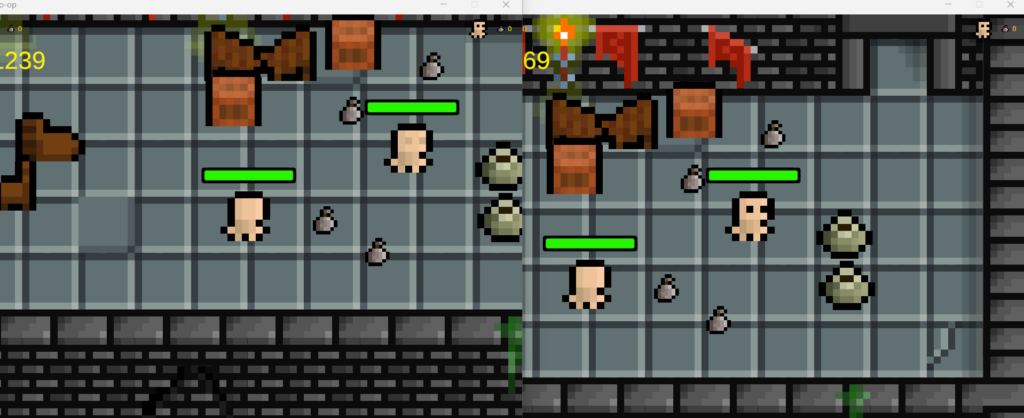
Below are two images of the spikes in the game. The first image shows how the spikes behave with almost no delay. They turn on and off simultaneously, so there is essentially no difference in timing. In the second picture, I have changed the pattern of the spikes and added a delay of 500ms. This causes the spikes to desynchronize, which makes it possible for the delayed client to walk through the spikes without experiencing any issues related to delay.


Pots & Pickups
Throughout the level, there are some pots that can be destroyed by the players. When pots are broken, they drop loot sacks that can be picked up. To indicate how many loot sacks the players have picked up, I added UI for up to 4 players in every corner of the screen. This UI will only show for connected players.

Invisible Features
Some of the features I have worked on are not easily visualized, such as server authority and server reconciliation. These features have been discussed previously and all function as intended.
Sources
- Carl Boisvert Dev. (2022, 27 november). Unity NetCode for GameObject – Client prediction [Video]. YouTube. https://www.youtube.com/watch?v=leL6MdkJEaE
- Client-Server Game Architecture – Gabriel Gambetta. (z.d.). https://www.gabrielgambetta.com/client-server-game-architecture.html
- Code Monkey. (2022, 26 september). COMPLETE Unity Multiplayer Tutorial (Netcode for Game Objects) [Video]. YouTube. https://www.youtube.com/watch?v=3yuBOB3VrCk
- Code Monkey. (2023, 6 maart). Learn Unity Multiplayer (FREE Complete Course, Netcode for Game Objects Unity Tutorial 2023) [Video]. YouTube. https://www.youtube.com/watch?v=7glCsF9fv3s
- Craig, M. D. (2023, 13 augustus). “Multiplayer Unveiled: A Primer on System Basics and Components”. Medium. https://medium.com/our-internship-journey/multiplayer-unveiled-a-primer-on-system-basics-and-components-1f53a69fe5c4
- Fast-Paced Multiplayer: Sample Code and Live Demo – Gabriel Gambetta. (z.d.). https://gabrielgambetta.com/client-side-prediction-live-demo.html
- Flarvain. (2023, 1 juni). Netcode for GameObjects Client Prediction Implementation [Code] – Pt 7 [Video]. YouTube. https://www.youtube.com/watch?v=px3bfYPQixA
- Fundy Coding. (2023, 12 januari). Unity NetCode – Custom Named messages [Video]. YouTube. https://www.youtube.com/watch?v=t23ekiaGYio
- Interpolation vs. Extrapolation | Photon Engine. (z.d.). https://doc.photonengine.com/bolt/current/in-depth/interpolation-vs-extrapolation
- Latency Compensating Methods in Client/Server In-game Protocol Design and Optimization – Valve Developer Community. (z.d.). https://developer.valvesoftware.com/wiki/Latency_Compensating_Methods_in_Client/Server_In-game_Protocol_Design_and_Optimization
- Let’s Learn This Together. (2022, 25 juli). What is Rollback Multiplayer? [Video]. YouTube. https://www.youtube.com/watch?v=LmX6a0PK6uQ
- samyam. (2023, 18 maart). The Ultimate Multiplayer Tutorial for Unity – Netcode for GameObjects [Video]. YouTube. https://www.youtube.com/watch?v=swIM2z6Foxk
- Team, I. (z.d.). A Guide To Network Congestion: Causes and Solutions I IR. https://www.ir.com/guides/network-congestion
- Technologies, U. (z.d.-a). Manage network latency. Unity. https://unity.com/how-to/manage-network-latency
- Technologies, U. (z.d.-b). Multiplayer network and server models. Unity. https://unity.com/how-to/intro-to-network-server-models#what-are-multiplayer-network-models
- Tricks and patterns to deal with latency | Unity Multiplayer Networking. (2024, 25 januari). https://docs-multiplayer.unity3d.com/netcode/current/learn/dealing-with-latency/
- What is Client-Side Prediction | Fish-Net: Networking evolved. (z.d.). https://fish-networking.gitbook.io/docs/manual/guides/prediction/version-1/what-is-client-side-prediction
- Wikipedia contributors. (2021, 10 oktober). Client-side prediction. Wikipedia. https://en.wikipedia.org/wiki/Client-side_prediction
- Wikipedia contributors. (2023a, mei 7). Lockstep protocol. Wikipedia. https://en.wikipedia.org/wiki/Lockstep_protocol
- Wikipedia contributors. (2023b, november 30). Netcode. Wikipedia. https://en.wikipedia.org/wiki/Netcode
- Wikipedia contributors. (2024a, februari 21). Peer-to-peer. Wikipedia. https://en.wikipedia.org/wiki/Peer-to-peer
- Wikipedia contributors. (2024b, april 6). Client–server model. Wikipedia. https://en.wikipedia.org/wiki/Client%E2%80%93server_model
