

Introduction
For my Research and Development project I want to make an Machine Learning ai that can solve a racing track faster then I can.
It is realy simple to create a client that navigates a car from checkpoint to checkpoint, but it is rather difficult to create a client that has a own perception of space and knows what to do and what not.
Research
Unity has made a open source toolkit that makes it easier for people to use machine learning / ai in games.
https://unity.com/products/machine-learning-agentsl
This toolkit makes use of two types of machine learning:
Deep learning:
Deep learning is a machine learning method that is kind of similar to the human brain.
The human brain consists of millions interconnected neurons that work together to learn and process information. A deep learning algorithm is a network of artificial neural ‘nodes’ which use mathematical calculations to process data.
A deep learning algorithm consists of multiple layers:
Input layer: In this layer the algorithm gets its information to run its algorithm on.
In the case of driving a car the algorithm needs a couple of things to be able to drive a car like:
Steer, Excelerate and brake.
Hidden layer: This layer sometimes consists of hunderds of layers to analyze and understand a problem from several different angles.
For example, in a image recognition algorithm it will compare the given image to images it already knows the definition of. If it is given a picture of something with hoves it could think it is a cow or deer because these animals have hooves, but if the animal on the picture also has cat eyes it could also be some type of wild cat. So in this way the algorithm will come up with a couple soultions.
Output layer:
This layer could consist of a couple of nodes. If you were to use a deep learning algorithm to check if something answers yes or no it would only have 2 nodes. But if you want to do an animal recognition like above you would maybe have 5 nodes to get multiple answers.

Reinforcement learning:
Reinforcement learning is a machine learning method based on rewarding desired behaviours and punishing undesired ones. Reinforcement learning also makes use of so called ‘agents’ which resemble the player. The player can have a certain behaviour and so can the agent. Some behaviours are desired such as walking in a certain direction or collectig certain objects. And other behaviours are not desired such as walking against a wall or dying. So by defining which behaviours are desired or not, we can give the agents a reward for having a desired behaviour and punish them for undesired behaviour.
The agent will then start a new iteration with its knowledge and will come to an ultimate solution.
Reinforcement learning is also a form of learning that is used in for example animal taming.
Example: You want to learn your dog how to play catch with you.
You give the stick to your dog and afterwords reward it with a little candy.
Then you lay the stick a little further and let your dog bring it back to you and then you give him a treat.
Then you can expand this to throwing it further and further away or hiding it and defining a ‘search word’.
This is a realy simple example of reinforcement learning, the agent (the dog) will understand what desired behaviour is after some iterations (the steps from holding the stick to searching for it on command).

(FSD) Full Self-Driving
In the real world there are examples of cars that make use of such algorithms to drive around the globe.
One of these examples is the Tesla AutoPilot.
For Tesla’s AutoPilot , Tesla made use of a super computer called Tesla Dojo. This super computer recieves millions of terrabytes of video footage from Tesla cars around the world and trains their alogrithm with this footage.
Tesla’s AutoPilot is a good example of what I want to make for this Research and Development.
It would be easier for Tesla to let their cars drive from coordinate to coordinate but this would be realy dangerous.
Instead they made theire car aware of his surroundings and navigate upon that.
Development
To save some time I will be using free assets of the unity store to give my game a little more of a game feel without spending to much time on getting or creating assets.
I will also make use of a car controller from the unity asset store and I will change it a little bit to meet my requirements.
I have added a SetInputs function:
public void SetInputs(float forwardAmount, float turnAmount) {
horizontalInput = turnAmount;
verticalInput = forwardAmount;
}
With this function I can set the input of the car through a script.
And i also added a Resetcar function:
    public void ResetCar()
    {
        rb.velocity = Vector3.zero;
        rb.angularVelocity = Vector3.zero;

        carVelocity = Vector3.zero;
        horizontalInput = 0f;
        verticalInput = 0f;
    }
I made this function to reset all of the car’s properties so it’s old behaviour can not influence its next behaviour.
I made this function after I had found out that this was a problem. My cars kept on rotating and moving in a different direction as intended so it had to do something with the rigidbody or transform and after creating this function I did not have any issues.
Script
To make the agent more configurable you have to add an agent script to it. You can create this script yourself by using the ML Agents package and then name your class like : ‘public class AgentScript : Agent { }‘ And importing ‘using Unity.MLAgents;‘ In this script you can configure a lot of things you want your agent to do or not. In the Agent class are a lot of functions you can use to train your agent. To make use of these functions you can call the function with the keyword override in front of it. You will do this because you want your agent to override the standard behaviour of the default agent.
At first we want the car to get a better understanding of its enviroment. Therefore we want it to have some information about itself but also about the finish. So this are all the possible data points I could find in the car controller script and standard things like the transform and the rigidbody. two intersting things maybe are the forwardAction and the turnAction. These 2 values are the values the agent script gives to the car controller script through a function.
public override void CollectObservations(VectorSensor sensor)
    {
        sensor.AddObservation(this.transform.position);
        sensor.AddObservation(this.transform.rotation);
        sensor.AddObservation(this.transform.forward);
        sensor.AddObservation(finish.position);
        sensor.AddObservation(car.carVelocity.normalized);
        sensor.AddObservation(car.maxSpeed);
        sensor.AddObservation(car.turn);
        sensor.AddObservation(car.accelaration);
        sensor.AddObservation(forwardAction);
        sensor.AddObservation(turnAction);
        sensor.AddObservation(timeElapsed);
        sensor.AddObservation(distToNext);
    }
Then we want the car to simulate some movement.
It does this with the Heuristic function. With this function it is possible to simulate the player controls.
Here we can define all the possible actions the agent can maken and what controls are atached to these actions. In this way we simulate player input instead of moving the agent in a predefined direction.
This function sets a list of actions that can be used in the neural network to influence the outcome.
    public override void Heuristic(in ActionBuffers actionsOut)
    {
        forwardAction = 0;
        if (Input.GetKey(KeyCode.UpArrow)) forwardAction = 1;
        if (Input.GetKey(KeyCode.DownArrow)) forwardAction = 2;

        turnAction = 0;
        if (Input.GetKey(KeyCode.RightArrow)) turnAction= 1;
        if (Input.GetKey(KeyCode.LeftArrow)) turnAction = 2;

        ActionSegment<int> discreteActions = actionsOut.DiscreteActions;
        discreteActions[0] = forwardAction;
        discreteActions[1] = turnAction;
    }
To make use of these actions we need a function called OnActionReceived:
This function makes use of the list of actions that is given by the Heuristic function and maps them to a certain value. By switching on the value of forwardAmount or actions.DiscreteActions[0] it can either be:
0 = no input is given
1 = KeyCode.UpArrow which means the car has to move forward
2 = KeyCode.DownArrow which means that the car has to move backwards.
Than it maps the value to a float and later sends it to the car through the function I have added to simulate player movement.
It does the same thing for turning left or right.
    public override void OnActionReceived(ActionBuffers actions)
    {
        float forwardAmount = 0f;
        float turnAmount = 0f;

        switch (actions.DiscreteActions[0])
        {
            case 0: forwardAmount = 0f; break;
            case 1: forwardAmount = +1f; break;
            case 2: forwardAmount = -1f; break;
        }
        switch (actions.DiscreteActions[1])
        {
            case 0: turnAmount = 0f; break;
            case 1: turnAmount = +1f; break;
            case 2: turnAmount = -1f; break;
        }
        car.SetInputs(forwardAmount, turnAmount);
    }
To reward the agent based on its behaviour I use unity collision detection functions like: OnTriggerEnter, OnCollisionEnter and OnCollision Stay.
I did not want to have a checkpoint based system in which an agent just drives from checkpoint to checkpoint. But in this case it just awards the agent by going in the right direction.
If it collides with this object with a tag “Target” it checks if this is the first time it intersects with this collider. (I do this because I dont want the agent to move back and forth in and out of a ‘checkpoint’ to get points instead of progressing down the track) and then it adds it to this list and rewards the agent with the amount of ‘checkpoints’ times 5.
Why I did this is because I want to reward the agent more and more as it progresses further on the track so it knows it is moving in the right direction.
private void OnTriggerEnter(Collider other)
    {
        if (cols.Contains(other))
            return;

        if (other.gameObject.tag == "Target")
        {
                cols.Add(other);
                AddReward(5 * cols.Count);

                float test = Mathf.Clamp01(checkpoints.Count / cols.Count);

                int points = Mathf.RoundToInt(Mathf.Lerp(100, 0, test));


                var statsRecorder = Academy.Instance.StatsRecorder;
                statsRecorder.Add("TrackProression", points);
        }
    }
In some places a trigger collider will not be sufficient as the agent will move through the collider and hit the finish or other parts that will give it more points.
In that case I have put a collider and changed the code so that if it hit this collider it will take away the same amount of points and also end the episode.
If the player collides with the object with a tag called “Finish” it will get significantly more points and end the episode. In this way the agent will know that it has to finish the whole track to get a lot of points.
    private void OnCollisionEnter(Collision collision)
    {
        if (collision.gameObject.tag == "Finish")
        {
            if (cols.Count != checkpoints.Count)
            {
                AddReward(-10f);
                EndEpisode();
            }
            else
            {
                float normalizedTime = Mathf.Clamp01(timeElapsed / 1000);

                int points = Mathf.RoundToInt(Mathf.Lerp(1000, 0, normalizedTime));

                print("Finished");
                print(timeElapsed);

                AddReward(points);
                EndEpisode();
            }
        }
    }
To force the agent to stay on the track it check every tick if it has collides with a object with a tag “Track” and it will give it a nice reward.
But also the other way around. It progressifilly subtracts points of it keeps driving against a wall.
      private void OnCollisionStay(Collision collision)
    {
        if (collision.gameObject.tag == "Track")
        {
            AddReward(2f);
        }

        if (collision.gameObject.tag == "Kill")
        {
            AddReward(-3f);
        }
    }
As mentioned above sometimes an episode will end. In this case the agent call a function called OnEpisodeBegin.
In this function I clear the collected track ‘checkpoints’ and call the reset function in the car controller that i’ve made.
And then I set the position and rotation to the start poistion and rotation.
    public override void OnEpisodeBegin()
    {
        var statsRecorder = Academy.Instance.StatsRecorder;
        statsRecorder.Add("TimeAlive", timeElapsed);

        timeElapsed = 0;
        cols.Clear();
        car.ResetCar();
        this.transform.position = Start.position;
        this.transform.rotation = Start.rotation;
    }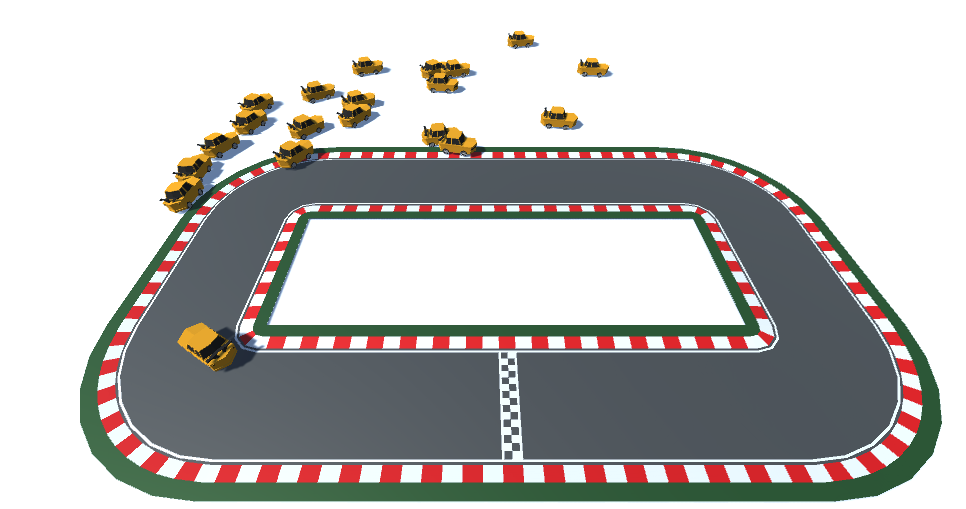
At first I have trained a model to drive around a track with only right hand turns, Then I trained my model with only left hand turns.
Based on these two models I have trained a model to drive around the track below.
At first you saw that they had the expected behaviour of driving around in circles.

To make the learning process faster I have added walls around the track otherwise the cars would constantly drive off the track.
Metrics
A big drawback of this research and development is that it takes a lot of time to train the ai models. To make the process of checking if a model is progressing in the way I want it to go I have implemented metrics.
This is a feature within ML-Agents called ’tensorboard’. To reach this you run the following command:
tensorboard --logdir .\results\This command will start the tensorboard application with all the results that you have made.
To access this application you need to open a web page with the following url :
http://localhost:6006/There are a couple of metrics that are preconfigured, here are some intersting ones:
- Policy/Entropy : This represents the amount of random choises that the agent makes.
This should decrease because the agent gathers more and more information to base theire choises on. - Policy/Value Estimate : This is an estimation of the amount of points a agent will gather when it progresses through his network. This should increase when certain obstacles are overcome.
- Environment/Episode Length : This metric speaks for itself, This should increase to certain point. At the beginning it will make mistakes that result into an ending of an episode. And afterwords its episodes will take more time to a certain point that it will improve to make the episode length as short as possible.

There is also a way to implement custom metrics.
This could come in handy when you want to measure certain things that are specific to your implementation.
In my case I found it interesting to measure the time alive of a car, this stands for the laptime of the car.
Here follows an example of how to add such custom metrics :
        var statsRecorder = Academy.Instance.StatsRecorder;

        statsRecorder.Add("TimeAlive", timeElapsed);
Conclusion
To train a model that does complex things like driving around a complex track, you need a lot of time.
I have ran this machine learning algorithm almost every day, and tweaked it every day but it still has not completed the entire track.
A thing that makes this really dificult is that, if you change the amount of inputs or outputs the whole hidden layer has to be reconfigured. So after chaning the input or output layer the model can start all over again.
What you can do is that you use the Initialize-from prompt in the command line and refer to your older runs. This will give the model an idea of what it should look like.
A better way is to define certain metrics with which you can decide if a certain change to your algorithm works or not.
Then you could run the algorithm for about 30 min and say if it was the way to go or if you need to change things to make it better.
I could also add more observations and sensors to make it a little bit faster, but overall I think ML-Agents is a nice tool te create ai behaviour in your game.
A follow up research could be to Implement this together with a difficulty range in which you could set the difficulty of the ai to make it more fun to race against.
Sources:
What is Deep Learning? – Deep Learning Explained – AWS. (z.d.). Amazon Web Services, Inc. https://aws.amazon.com/what-is/deep-learning/
Hashemi-Pour, C., & Carew, J. M. (2023, 16 augustus). reinforcement learning. Enterprise AI. https://www.techtarget.com/searchenterpriseai/definition/reinforcement-learning#:~:text=Reinforcement%20learning%20is%20a%20machine,learn%20through%20trial%20and%20error.
Ramey, J. (2024, 26 januari). Tesla Bets on AI in Latest FSD Update. Autoweek.
https://www.autoweek.com/news/a46535912/tesla-fsd-ai-neural-networks-update/
Wikipedia contributors. (2024, 27 maart). Tesla Dojo. Wikipedia. https://en.wikipedia.org/wiki/Tesla_Dojo
Technologies, U. (z.d.). Using TensorBoard to Observe Training – Unity ML-Agents Toolkit. https://unity-technologies.github.io/ml-agents/Using-Tensorboard/

Vervolgstappen en overwegingen voor 27 maart ’24:
1. Maak een track waar alle agents op kunnen rijden en dat ze zichzelf on the fly trainen.
2. Versnellen of automatiseren van het proces van trainen van de auto.
3. Finetunen van de sensoren/observaties van de agent.
4. Wellicht zijn er nog andere packages dan degene die je nu hebt gevonden? Misschien onderzoeken welke andere tools er nog beschikbaar zijn.
5. Verschillen in moeilijkheid tussen “zeer sterk” en “beginner”?