
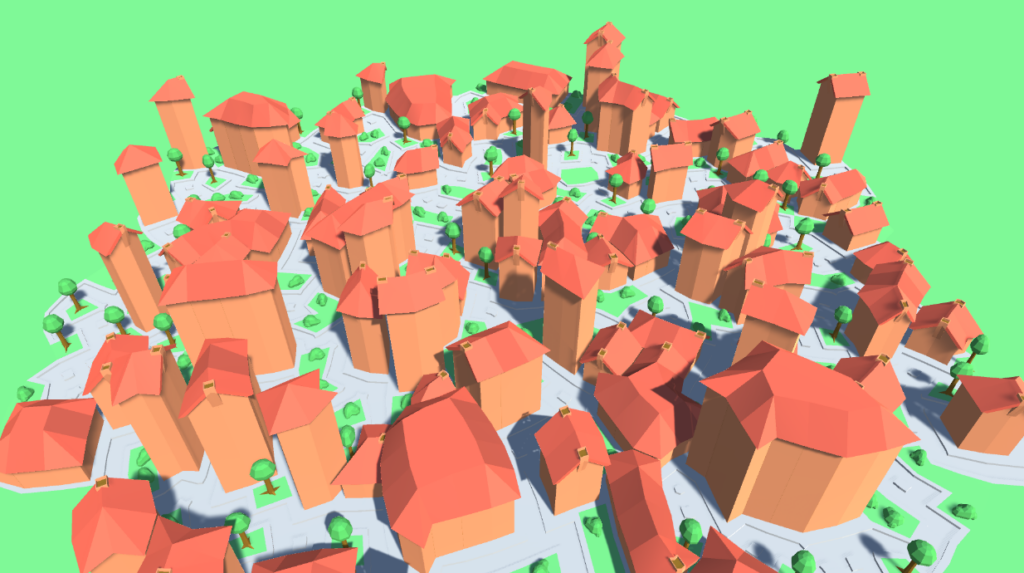
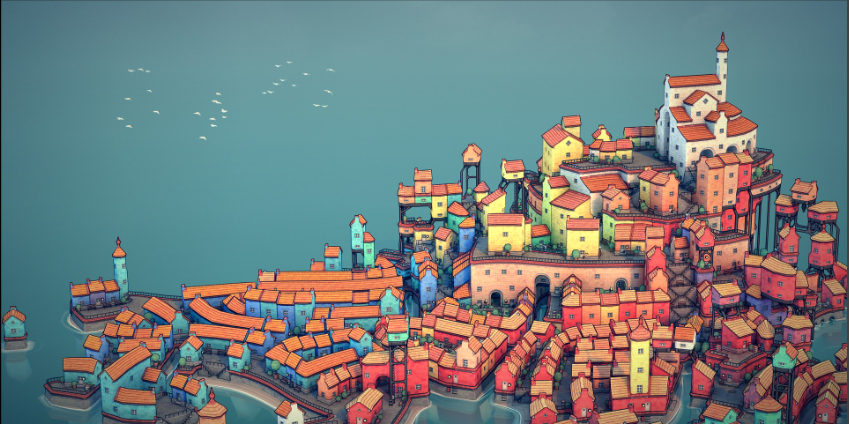
With procedural content generation of level layouts often the results look very square like. For most cases this is not a problem. But in the case of towns or even cities the layout is more organic especially in older towns or cities. Inspired by Townscaper by Oskar Stålberg (Townscaper, z.d.), the goal of this R&D is to procedurally generate towns that look organic like the towns generated in Townscaper. This article aims to delve into Townscaper and research how this organic feel is created with PCG. The result will be a randomly generated town with roads and houses and a variety of props like trees and bushes to make a believable town.
The article is split in different steps. It starts out by generating a grid based on the grid of Townscaper. Because of the use of a grid, the town consist of modules that occupy it. The grid is irregular, meaning the squares of the grid have different shapes and thus the modules need to be deformed to fit. Then it is just a matter of placing the modules in the right way so it looks like a town. The PCG algorithm used is Wave Function Collapse.
Generating The Grid


After watching Oskar Stålberg’s talks about Townscaper (Sweden Game Arena, 2021), I figured out how the grid achieved a natural look. It involved a few steps:
- Step 1. Create a hexagon of triangles (Figure 1)
- Step 2. Merge the triangles to create quads. Because of the shape not all triangles will become quads this creates variety. (Figure 2)
- Step 3. Subdivide al the quads and triangles. this makes sure that the triangles become quads. (Figure 3)
- Step 4. Relaxing the grid. This makes all the quads more square and gives the grid its natural curves. (Figure 4)
On the left are all the steps I recreated. Additionally, the merging process is randomized to generate different kinds of grids. For all the steps I made my own algorithms as I was unable to find any documentation or recourses useful to my application. The main thing I got stuck on where reference and value types. For how I implemented the algorithm I used tiles (The quads and triangles) and edges (the line between the vertices). To relax the grid I had to move the vertices so all the tiles that are connected needed a reference to the vertex. But in unity Vector3 is a struct thus a value type. Consequently, I had to make my own class of vertices. This also had the advantage that I could add an other attribute force to help with the relaxing algorithm.
The relaxing algorithm tries to make each tile more square. To determine what a square is I used the following rules: every side must have the same length, and the diagonals of the square needed to be the hypotenuse of the desired length of the squares which in my cases was .5 units. The less square a tile is according to the rules the stronger the force would be on the vertex. By iterating over this it slowly settles to an equilibrium.
Placing The Modules
The first challenge was to deform the mesh to the shape of the tile. A lot of recourses about deforming a mesh used Gaussian Algorithms. I didn’t implement this because I thought it would not achieve the desired look. Instead, I came with a solution myself. The problem I had with a Gaussian solution was that it used the distance to a point to determine how much it would deform, and then would apply a non linear force to the vertex based on the distance. I haven’t tested this solution as I thought it wouldn’t create straight lines on the edges and there was not a good way to determine a fall of point for my application. Instead, the distance of every vertex of a mesh gets checked with the distance of every corners edges and then applies a linear force to the vertex. The code assumes that all the models are with in the bounds of 0.5 by 0.5 local space.


For the PCG algorithm I chose to use wave function collapse. For this function I first need to determine adjacency. In the article from Kleineberg (Kleineberg, 2019) they explain that they assign a socket to every side of a model, and based on these sockets we can determine the adjacency. I used a standard explained in this YouTube video about wave function collapse(Martin Donald, 2020). The sides are labelled with an index and if it is symmetrical an “S” and if it is asymmetrical a “F”. Symmetrical sockets can join with themselves while asymmetrical sockets can only be joined with the flipped version of themselves. For example: 0 can join with 0F but not with 0 because its not symmetrical. 0S can join with 0S because its symmetrical. for the top and bottom rotation needs to be taken in account. 0_0 the first number indicates the index and the second number indicates the rotation. To make the sockets, loop over every side and get the vertex positions that are on the edge of that side and create a socket accordingly. In blender, I made models of every module to make a house and roads. I only modelled 1 rotation of the model and then in code create the models of every possible rotation. This saves me time adding new modules without creating every possible rotation. As you can see on figure 7 it does not create rotations for my flat piece as it is rotationally symmetrical. The data from this algorithm will be saved in a JSON that can be read at run time.
Wave Function Collapse
Figure 9 shows the result of the wave function collapse. I used the same YouTube video that explains the adjacency rules to figure out the logic of wave function collapse (Martin Donald, 2020). First the grid is made in to a 3D grid with cells. At the start, every cell has all possibilities. The algorithm keeps going in a loop till all the cells in the grid have collapsed to a single possibility.
- Every loop it takes the cell with the least amount of possibilities and collapses that cell by randomly choosing one of the possibilities.
- After collapsing, it has to iterate over all the cells updating the possibilities.
- First it updates the possibilities of the neighbouring cells, possibly removing possibilities and then updates the neighbours of that cell, till all cells are updated. And then the loop starts again
I had to adjust the adjacency check to fit my needs. Because the rotation of the cell is not known, it has to check what edge connects the neighbouring cells. Figure 10 is an example of a scenario. In the module data the socket ID is associated with an edge. For example the left edge 0 and 1 has to be checked with the neighbours socket ID 0 and 1. And for the right 2 and 3 has to be checked with 3 and 0.

To help the algorithm getting started, at the initialization part the possibilities are reduced at the edge of the grid, so that its not possible to get the inside of a house at the edge.

Custom Constraints
With wave function collapse, adding additional constraints can help the algorithm better achieve desired results. One of the constraints is a way for roads to not be adjacent to each other making more realistic roads. An other good way is to add weights to the modules so the algorithm is more likely to select certain modules. By adjusting these weights, the algorithm made the houses more spread out, also helping with better road generation. Adding too many custom constraints can make it more difficult for the algorithm to find a solution. Taking longer to generate.
Adding Props
Adding props makes the town feel more detailed. After the wave function collapse trees and bushes are added to grass tiles. I used a game of life approach (John Conway’s Game Of Life – An Introduction To Celluar Automata, z.d.). By looking at the neighbours of every grass tile it decides if it needs to be a tree or a bush. For example, if a grass tile has no other grass tiles neighbouring it, then it needs to be a tree. If it has two grass tile neighbours, then it is a bush. This gives more control then just adding trees and bushes randomly to tiles. This approach makes it possible to see the difference between a single grass tile and a park consisting of multiple grass tiles.
Conclusion
Putting everything together as described in the article makes natural looking towns , where even with just a few different modules a complex town can be generated. The grid creates curves and makes the town look more organic. With the information shared by Oskar Stalberg, I managed to start my research and piece together the steps to generate the towns.

First figuring out to make hexagonal grid and apply my own algorithm to relax the grid based on relaxation algorithm. Then I proceeded with fitting the modules in irregular shaped tiles. Furthermore, based on, I created an algorithm that determined the adjacency rules of the modules. Now the grid is ready to be filled with the modules using the wave function collapse algorithm, allowing for random structures and roads to be formed. Finally, to add details to the town, I added props like trees and bushes, based on the game of life approach.
Through this endeavour I have faced some challenges, particularly when trying to find literature on how to translate into code the idea I had in mind. The sources I found where helpful, but not directly applicable to my specific goal. This led me to use my creativity and critical mind allowing me to adapt the algorithms and ideas portrayed in the literature to create my own code. By combining diverse sources and algorithms, I managed to create a unique approach to accomplish my goal.

Future works
There are some things that can be improved. The simplest thing is to just add more modules to create different structures, like a church, city walls or canals. Often on bigger grids it takes multiple iterations before it can find a solution and the whole grid collapses. By writing a test that checks why a solution cant be reached, it would be easy to make modules that can fit in places where it couldn’t find a solution. An other major thing is performance. If it would be applied in a game the generation as it is now would be hidden behind a loading screen but it will still take considerable amount of time before its done. It would be nice if it could be at run time and the player is able to keep walking as the town is generated around him. As a final note, there are no doors and windows on the buildings Oskar Stalberg explains in his talks how he did it which sounds like an interesting approach. Its especially difficult with doors because a house typically doesn’t have more than 2 doors. One way to fix it is to have an algorithm that detects what a single house is and how big it is to determine the amount of doors needed on a building.
References
Townscaper. (z.d.). https://oskarstalberg.com/Townscaper/
Sweden Game Arena. (2021, 8 december). SGC21- Oskar Stålberg – Beyond Townscapers [Video]. YouTube. https://www.youtube.com/watch?v=Uxeo9c-PX-w
Martin Donald. (2020, 31 juli). Superpositions, Sudoku, the Wave Function Collapse algorithm. [Video]. YouTube. https://www.youtube.com/watch?v=2SuvO4Gi7uY
Kleineberg, M. (2019, 6 januari). Infinite procedurally generated city with the Wave Function Collapse algorithm. Marian’s Blog. https://marian42.de/article/wfc/
John Conway’s Game of Life – An Introduction to celluar Automata. (z.d.). https://beltoforion.de/en/game_of_life/
